
How Many Security Cameras Does a House Need in Hamilton?
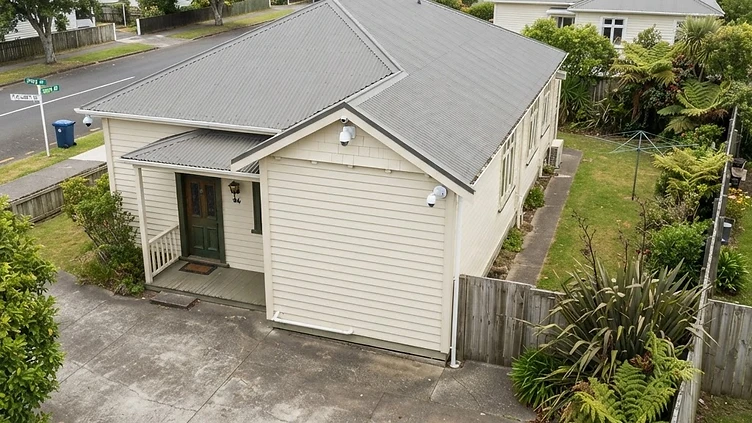
Illustrative image. Not a photograph of a completed 2E Electrical installation.
There's no universal number of cameras a house needs. This guide explains how entrances, driveways, section size and routines shape the right camera count for your Hamilton property.
Homeowners often ask how many cameras they need before they've even thought about what they want those cameras to actually show them. The honest answer is that it depends on your property, not on a standard package size. A tidy townhouse on a small Rototuna section has very different needs to a lifestyle block out past Tamahere, and working through the layout logically gets you a far better result than guessing a number upfront.
There's No Single Right Number for Every Home
Some Hamilton homes are well covered with three or four cameras, while others genuinely need six, eight, or more. The right number comes from mapping how people, vehicles and deliveries actually move around your section, then deciding what you want recorded if something goes wrong.
It also depends on what matters to you personally. Some homeowners mainly want to see who's at the front door and know if a vehicle comes up the driveway. Others want full coverage of every boundary, especially if they've had previous issues with trespassing, theft from vehicles, or simply want peace of mind while away from home. Both are reasonable goals, but they lead to different camera counts.
Rather than starting with a budget or a product bundle, it helps to walk your own property with a notepad and think about each access point in turn.
Entrances: The Non-Negotiable Starting Point
For most households, the front door is the single most important camera position. It lets you see who's arriving, confirm deliveries, and often doubles as a basic visual check before opening the door. A second entrance camera is worth considering if your home has a side door or ranch-slider that's used regularly, particularly if it's not visible from the front.
Placement matters as much as camera count. A camera mounted too high to avoid tampering may lose useful facial detail, while one mounted too low may be vulnerable to interference. An experienced installer will balance height, angle and lighting to get a usable image rather than just a wide, unhelpful view.
Driveways and Street-Facing Areas
Driveways are high on most homeowners' lists, especially for identifying vehicles or keeping an eye on the street-facing boundary. A single camera can often cover a straight, short driveway, but longer or curved driveways, shared accessways, or properties with on-street parking may need two angles to avoid gaps.
It's also worth thinking about whether you want number plates readable. That usually requires a more deliberately positioned camera rather than relying on a wide driveway shot, since image clarity drops quickly with distance and angle. If this matters to you, say so clearly when discussing placement with your installer.
Side Access, Rear Yards and Blind Spots
Side access paths and rear yards are where coverage gaps most often get missed, because they're not part of daily routine the way the front door is. Narrow side passages, gates, and fence lines are common entry points for anyone trying to avoid being seen from the street, which is exactly why they're worth covering.
Rear yards vary enormously in size and shape, so one camera might suit a compact courtyard section while a larger backyard with multiple fence lines may need two to avoid leaving a blind corner. Trees, sheds, trampolines and garden structures can also create unexpected blind spots that only become obvious once you're standing in the yard working it out in person.
Garages, Sheds and Outbuildings
Garages and outbuildings often store vehicles, tools, bikes and other valuables, making them a sensible addition even if they weren't part of the original plan. A camera covering the garage door or roller door area can be useful both for security and for simply confirming the door was closed properly.
On larger properties, sheds and workshops set back from the house are easy to overlook, but they're sometimes the least overlooked by anyone passing by at the boundary. If you've got outbuildings some distance from the house, cabling and power become part of the conversation, which is where Home CCTV planning really earns its keep.
Section Size, Layout and Household Routines
Section size has an obvious effect on camera count, but layout matters just as much. A rectangular section with clear sightlines might need fewer cameras than an irregular one with multiple corners, fences, or separate access points. Corner sections, rear lanes, and properties backing onto reserves or walkways often warrant extra attention simply because they have more potential points of approach.
Household routines matter too. A family with teenagers coming and going at odd hours, frequent deliveries, or a home business running from the garage will usually want more comprehensive coverage than a quieter household. Lifestyle block and rural property owners face a different scale of challenge again, with gates, driveways and outbuildings spread over a much larger area — something covered in more depth under Rural CCTV.
Practical System Considerations
Once you've worked out roughly where cameras are needed, the technical side shapes what's realistic. Wired cameras generally offer more reliable recording and are less affected by Wi-Fi congestion, but running cable to a detached garage or back corner of a large section takes planning and sometimes additional conduit work. Recording is usually handled by a dedicated recorder stored securely inside the home, with footage held locally for a set period depending on storage capacity and the number of cameras recording continuously.
Good night-time footage depends on a camera's low-light performance and nearby lighting, not just the camera count, so it's worth discussing lighting at the same time as placement. Remote viewing from a phone app is standard with most modern systems, letting you check cameras while out, though this relies on a stable internet connection at the property.
If you're adding to an existing setup rather than starting fresh, it's often more cost-effective to extend what's there than replace it entirely — worth raising under CCTV Upgrades rather than assuming a full new system is required.
Questions to Ask Your Installer
Before settling on a final camera count, it helps to ask an installer to walk the property with you rather than quoting from a floor plan alone. Useful questions include where blind spots currently exist, what resolution is realistic for driveway or number plate coverage, how storage duration is affected by adding more cameras, and what cabling path is practical for outbuildings.
It's also worth asking how the system would cope with future additions, since many homeowners start with core entrances and driveway coverage, then add side or rear cameras later once they've lived with the system for a while. A good installer should be comfortable explaining trade-offs rather than pushing a fixed number. If you'd like someone to look at your specific layout, you can contact the team to talk through what coverage would actually suit your property.
FAQs
For many standard sections, four cameras covering the front entrance, driveway, and one or two rear or side access points is a reasonable starting setup. Larger or irregularly shaped sections, or homes with multiple access points, often need more to avoid leaving gaps.
Not necessarily. It depends on how each side is used and whether it offers a realistic access point. A fully fenced side yard with no gate may need little coverage, while an open side path used regularly would be a higher priority.
Yes, this is common. Many homeowners begin with entrances and driveway coverage, then add further cameras once they've identified gaps through everyday use. Choosing a system that supports expansion from the outset makes this easier.
Not automatically. Camera placement, image quality, and lighting matter as much as the total count. A smaller number of well-positioned cameras often gives more useful footage than a larger number poorly placed.
Related Articles
CCTV Guides
Wired vs Wireless CCTV: Which Is Better for Your Property?
A practical comparison of wired and wireless CCTV systems for Hamilton and Waikato homes, businesses and lifestyle blocks, covering reliability, power and maintenance.
Home Security
Best Places to Position CCTV Cameras Around Your Home
A practical guide to positioning CCTV cameras around a New Zealand home, covering entrances, driveways, lighting, glare and privacy.
Rural CCTV
CCTV for Farms: What Should You Monitor on Waikato Properties?
Practical guidance for Waikato farmers and lifestyle block owners on what to monitor with CCTV, and how to handle distance, power and connectivity.